Adhoc Sub Processes are a powerful, but often overlooked, feature in BPMN that allow you to create a sub process where a knowledge worker has discretion to use, or not, activities to perform a task. They can perform those activities in any order, can repeat an activity, don’t need to perform all of the activities, and can stop the sub process when they deem it complete. These adhoc sub processes are often one part of a bigger process that does have the more traditional, step-by-step sequence flow of normal workflow.
Example: An example of this mixture of step-by-step workflow with an unstructured, adhoc step is a typical doctor’s office visit. Step-by-step sequence flow exists to book an appointment, check-in, be weighed and measured, and put into the waiting room. But inside the doctor’s office, the doctor has 100+ questions, tests, procedures, and analyses that she can perform, in any order, sometimes more than once — to get to a diagnosis and complete the consultation. After this, the process reverts to sequential step-by-step workflows — for billing (billing – insurance – payment), for tests (send to lab, get results, doctor’s review, schedule follow-up), for prescriptions (prescribe – send to pharmacy), and for follow-up appointments and referrals. This is an extreme example, but one that we can all relate to.
Example: Car Insurance Claims Processing. Many steps in the claims process are step-by-step sequence flows, but central to the process is a review of the claim by an insurance claims professional. The loss assessor has access to all of the claim information, but has additional tools that can be selectively used if his judgement suggests that the claim might be suspicious — from checking out the vehicle, the claimant, the repair shop, the cost, etc.
Flows for APEX v26.1 Supports Human Knowledge Worker Processes and Fully Autonomous Agents
Flows for APEX v26.1 allows you to model the activities that can be performed by a knowledge worker to complete a step in the business process. These activities are standard BPMN activities, such as user tasks, script tasks, service tasks requesting information from a REST source, a human approval, etc. Sometimes these activities can be part of a short chain of activities — if you perform A, you must then do B and C. An included activity can be a regular sub process (allowing the detail to be hidden or abstracted) or a call activity (where the details are contained in another diagram, that can be reused across multiple business processes).
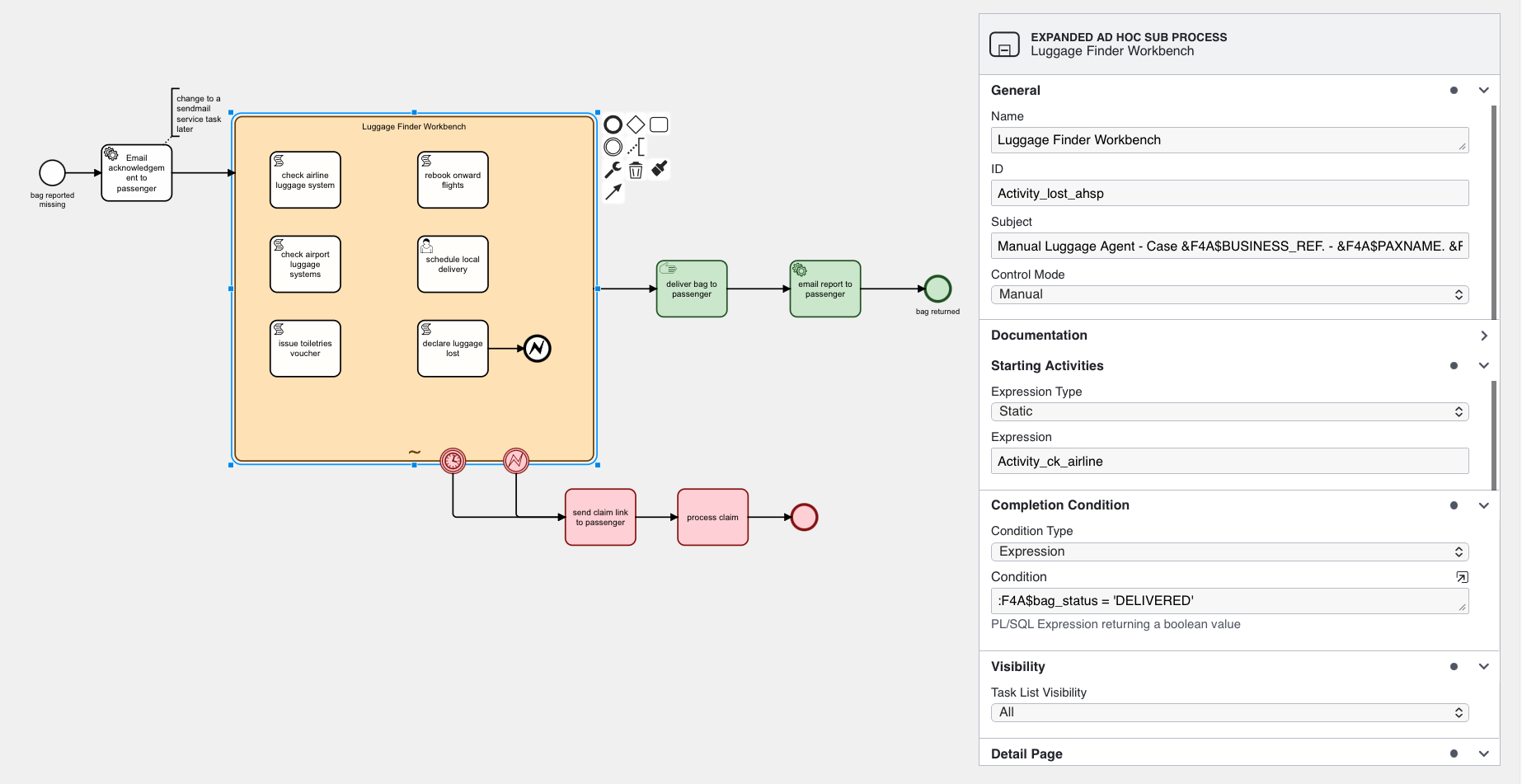
Some other concepts that can be added to the model:
- The adhoc sub process can have a set of activities that are started automatically when the adhoc sub process starts. This can be a static list, or created dynamically in the process and run dynamically when the process starts.
- The adhoc sub process can have a completion condition, which defines when the sub process has completed and the workflow moves forwards to the next sequential activity. Any still-running activities inside the adhoc sub process are terminated.
- BPMN boundary events can be added to the adhoc sub process — so that, for example, the process sends reminders if not completed by a given time, can terminate if not completed by a cut-off time, or can send a message to a manager if the process sends an escalation request.
- Activities inside the adhoc sub process may require input parameters. When run as a manually controlled adhoc sub process, the application can automatically create an input form to collect this information — without having to precede each task with a user task.
- Adhoc Sub Process and task definitions are designed for easy user (and AI) use. In addition to a technical name, each activity has a descriptive name and a short description of its purpose. These are used in creating both a human UI and prompts for any AI support.
- Task definitions include ordering and grouping information that can be used for UI layout. Additionally, you can define whether the Adhoc Sub Process and/or any user tasks that it creates appear in the unassigned user’s task list.
- Activities can be specified as being allowed to be performed only once or as repeatable.
- Activities can optionally have a starting condition, meaning that the activity is only available to be started when a condition is true. Combined with a process variable containing a process state, this allows staging and gating of activities within the overall sub process.
- By convention, each activity in an adhoc sub process returns output parameters that include a short, textual result statement and optionally a list of key outputs. By having standardised outputs, these can be collected to provide a brief summary of what activities have been performed so far, and with what result. These can be easily reviewed by the user or AI controlling the adhoc sub process.
Automatically Transforming Model to App User Interface
The Adhoc Sub Process definition features allow simple and automatic creation of run-time user interfaces:
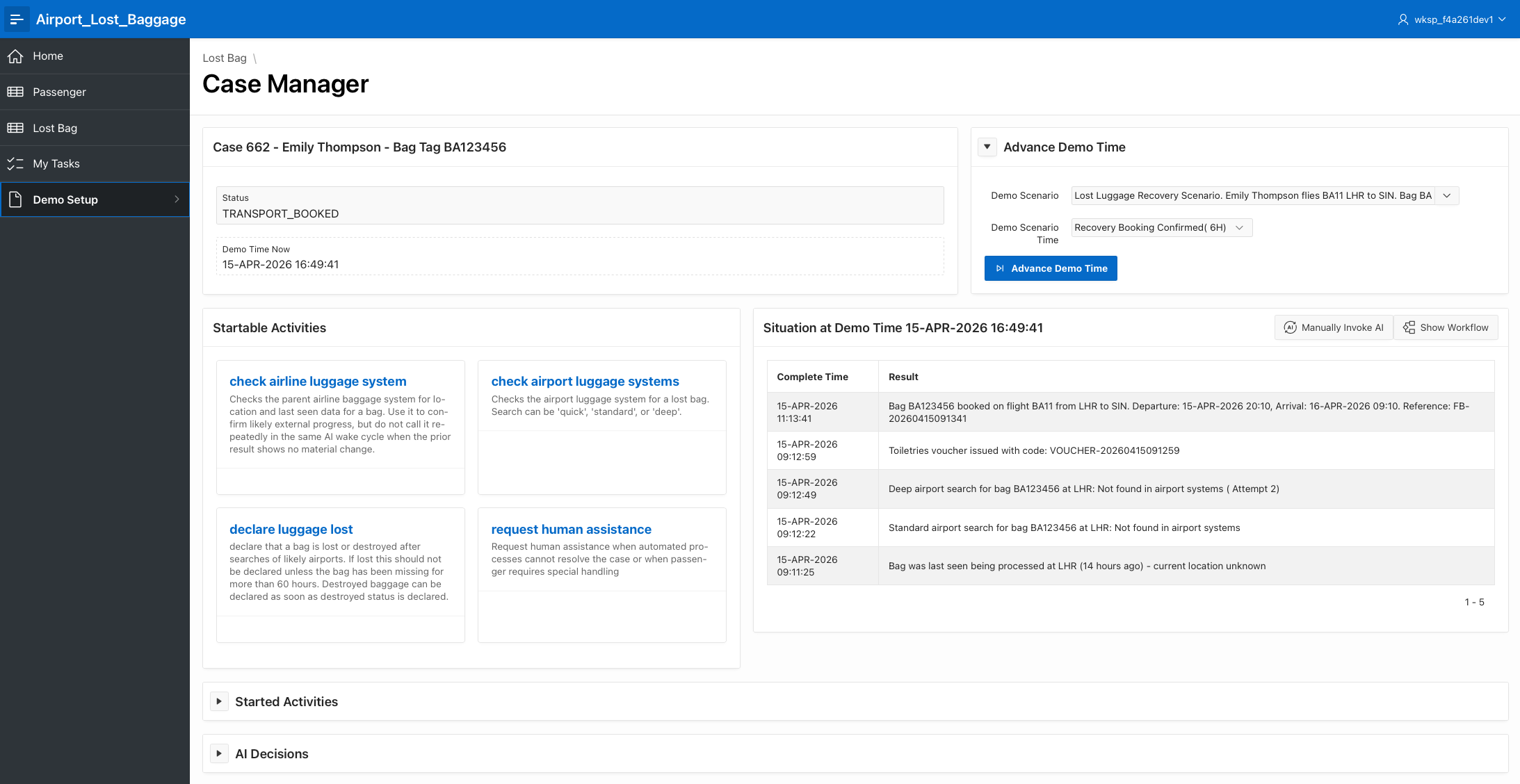
- Available Activities
- Completed Activities Log
Adding AI
While everything described above has great value in creating business processes that contain complex, adhoc tasks for manual knowledge workers, we can also provide powerful capabilities to add today’s advanced AI engines to control of the Adhoc Sub Process.
AI support can be provided at 3 levels of control:
- Recommendations — where the sub process is performed by a human user, but at any point the user can ask for a recommended next course of action from AI. The recommendation can be accepted or dismissed, optionally capturing the reason for dismissal for model tuning.
- Hybrid — where the user lets AI recommend and execute the next steps, or
- Fully autonomous — where AI is in control of the adhoc sub-process and it executes fully autonomously.
Configuring an adhoc sub process for AI support is simple, and requires a text definition of the subprocess objective. The AI engine can be connected via the built-in APEX AI package, or using the United Codes AI package — allowing a full range of modern models to be used even on older APEX versions like APEX 24.1.
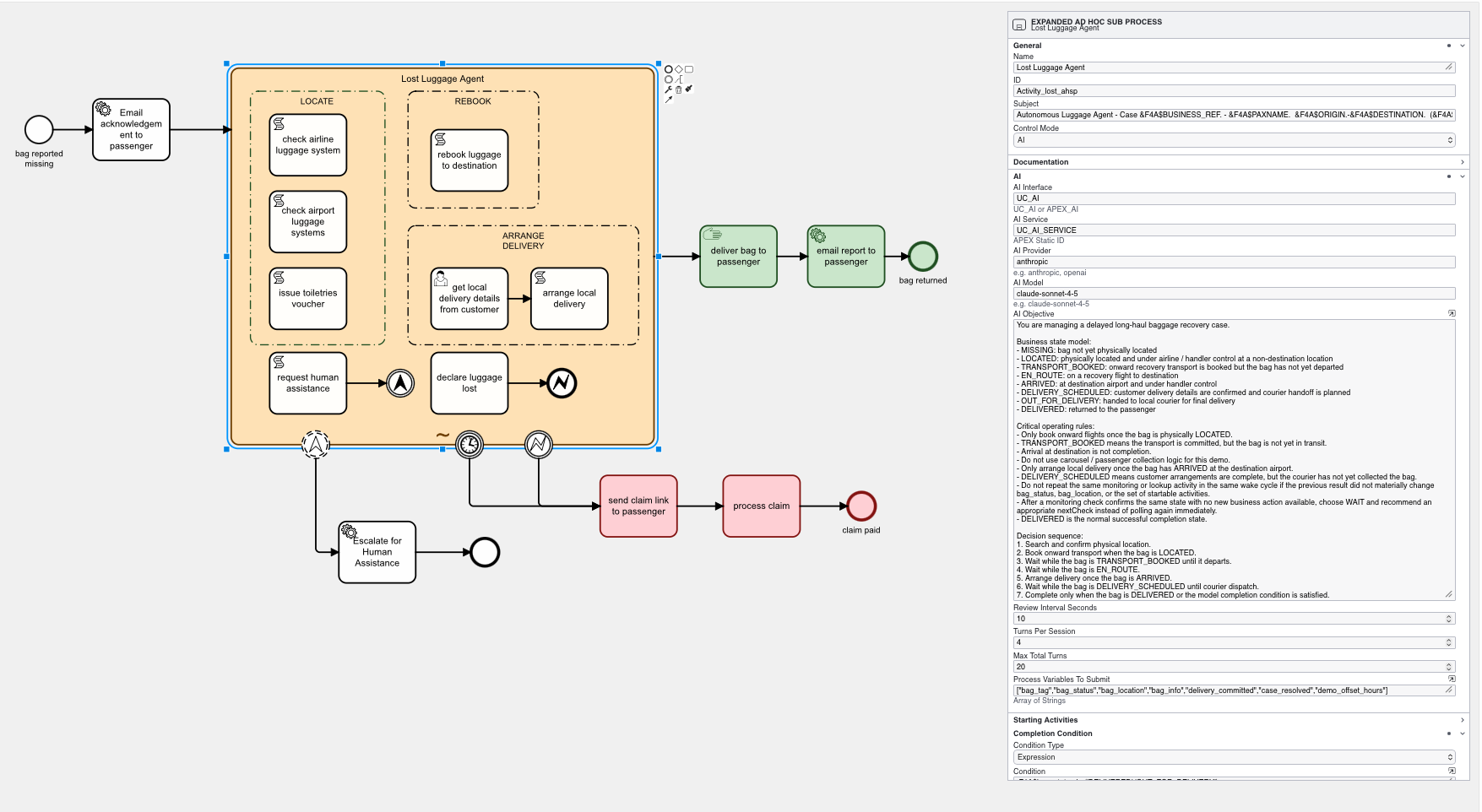
At run time, Flows for APEX pulls together the sub process objective, details of currently available activities to start, a summary of currently running and already completed activities, and the current values of selected process variables so that the AI engine can understand the current situation and recommend or execute accordingly.
When running autonomously, the Flows for APEX engine manages how often and when the AI agent is called, to ensure efficiency and prevent wasted AI token spend. This includes managing the number of ‘turns’ that the AI agent gets at any time point / triggering event, the overall number of turns, and the waiting time before another turn can occur if a running activity has not yet completed.
Recommendation Mode
Not all applications are able to go to autonomous operation, or are comfortable yet to go fully autonomous. Flows for APEX handles these concerns through several mechanisms:
- Automating processes through a BPMN framework provides guardrails so that organisations only allow AI to perform known BPMN-defined activities, while still preserving the strong control and auditability present in Flows for APEX.
- A BPMN adhoc sub process can contain (human) user tasks, (human) approval tasks, and deterministic BPMN Business Rules Tasks — so an autonomous adhoc sub process can be subject to control from non-AI tasks at critical control points.
- All AI-engine calls in Flows for APEX return a human readable rationale or explanation from the AI engine to justify its decision making process. These rationales can be exposed in the application for users, and can also be included in the process logging and into the instance logging archive document so that the rationale for a process outcome can be understood — both now and in several years time.
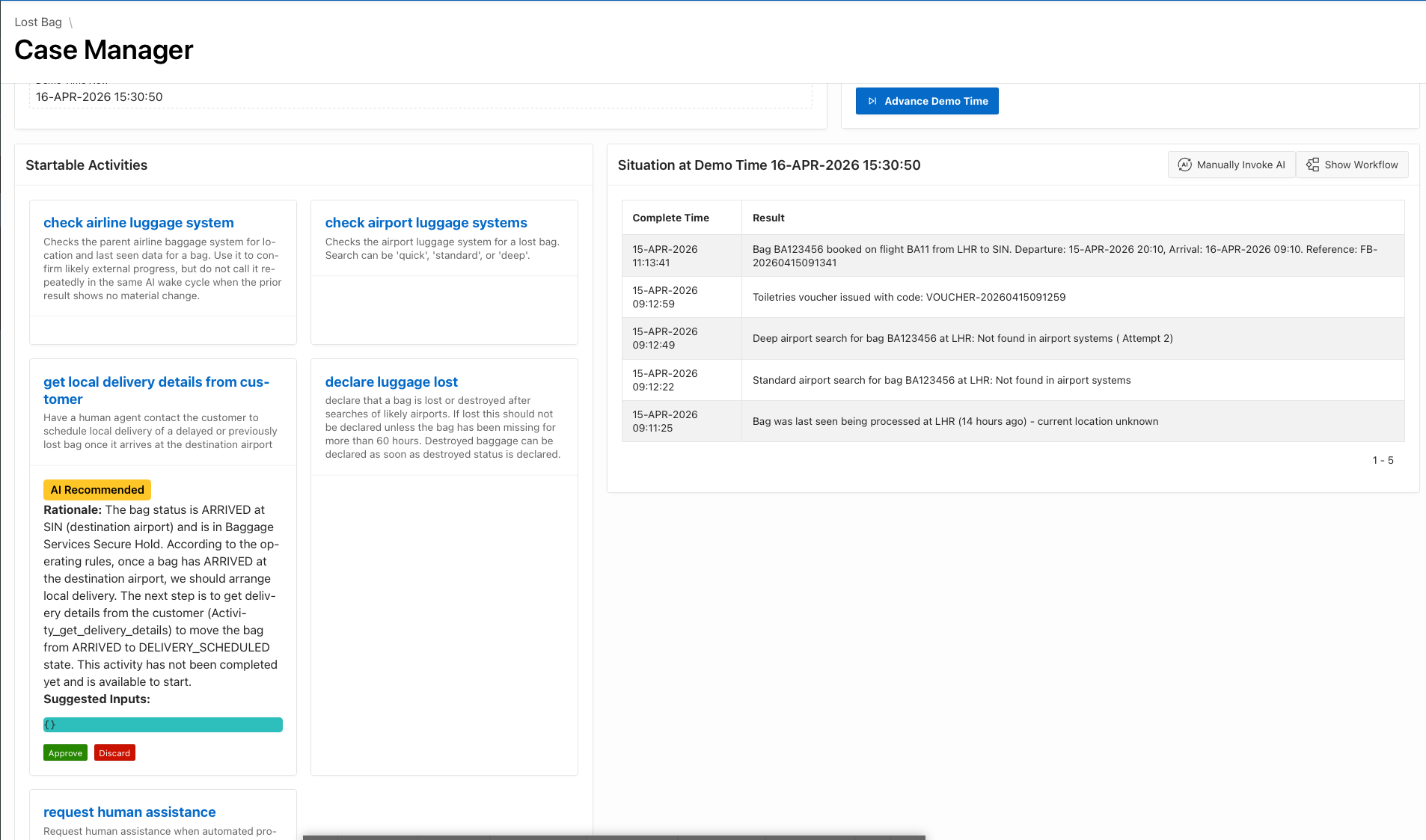
- While gaining confidence in the AI, or in regulated environments where a human has to make the critical process decisions, an adhoc sub process can be run in recommendation mode. This provides the user with a recommended next step, including justification, for the user to accept or discard.
Contact Flowquest or Book an exploratory meeting to explore how Adhoc Sub Processes can improve your knowledge worker workflows.