While manually controlled Adhoc Sub Processes already provide strong support for knowledge-worker workflows, Flows for APEX 26.1 also adds powerful capabilities to use modern AI engines to control the Adhoc Sub Process.
AI support can be provided at 3 levels of control:
- Recommendations, where the sub process is performed by a human user, but at any point the user can ask for a recommended next course of action from AI. The recommendation can be accepted or dismissed, optionally capturing the reason for dismissal for model tuning.
- Hybrid, where the user lets AI recommend and execute the next steps.
- Fully Autonomous, where AI is in control of the adhoc sub process and it executes fully autonomously.
Configuring an adhoc sub process for AI support is simple, and requires a text definition of the subprocess objective. The AI engine can be connected via the built-in APEX AI package, or using the United Codes AI package, allowing a full range of modern models to be used even on older APEX versions like APEX 24.1.
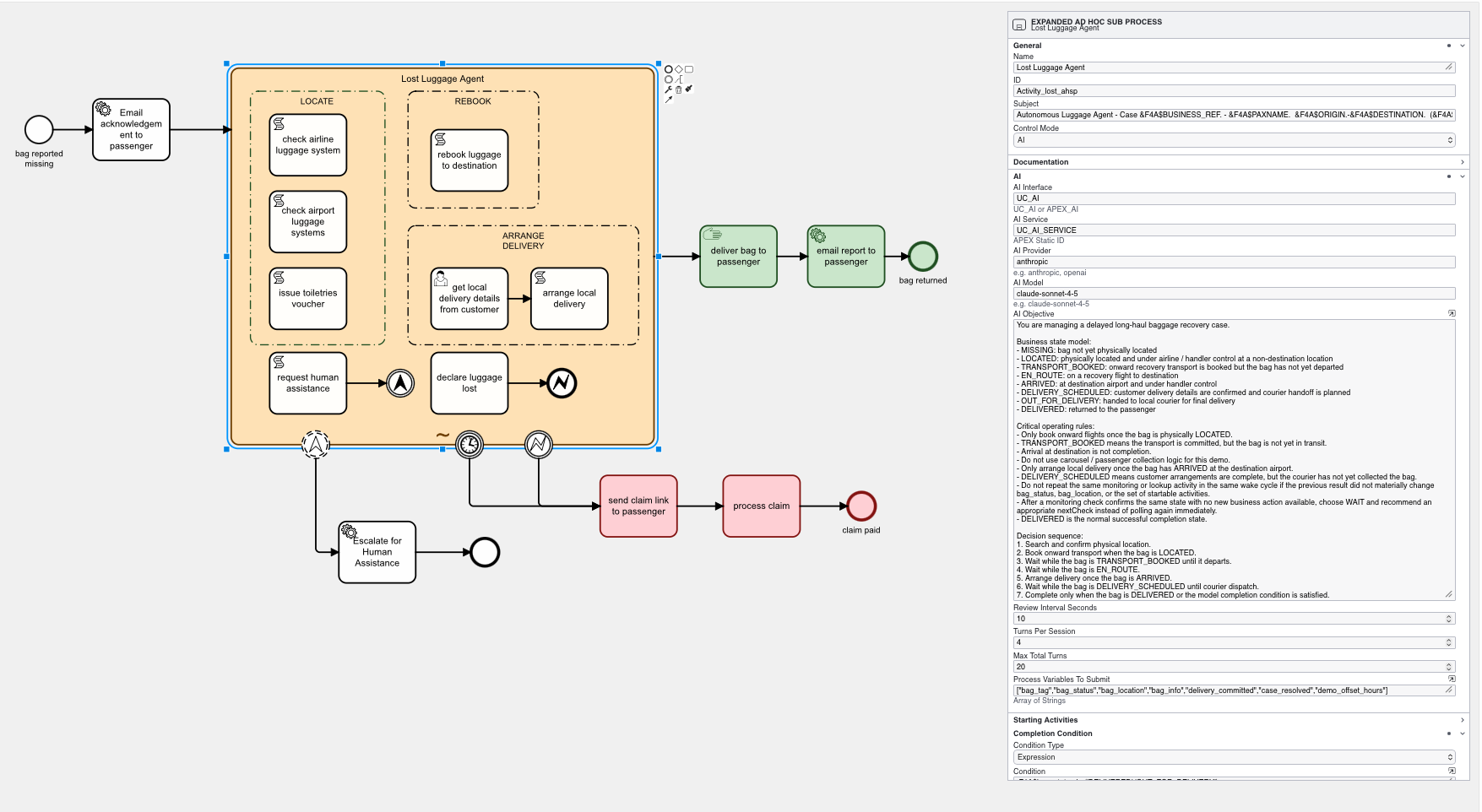
At run time, Flows for APEX pulls together the sub process objective, details of currently available activities to start, a summary of currently running and already completed activities, and the current values of selected process variables so that the AI engine can understand the current situation and recommend or execute accordingly.
When running autonomously, the Flows for APEX engine manages how often and when the AI agent is called, to ensure efficiency and prevent wasted AI token spend. This includes managing the number of turns that the AI agent gets at any time point and triggering event, the overall number of turns, and the waiting time before another turn can occur if a running activity has not yet completed.
Recommendation Mode
Not all applications are able to go to autonomous operation, or are comfortable yet to go fully autonomous. Flows for APEX handles these concerns through several mechanisms:
- Automating processes through a BPMN framework provides guardrails so that organisations only allow AI to perform known BPMN-defined activities, while still preserving the strong control and auditability present in Flows for APEX.
- A BPMN adhoc sub process can contain human user tasks, human approval tasks, and deterministic BPMN Business Rules Tasks, so an autonomous adhoc sub process can be subject to control from non-AI tasks at critical control points.
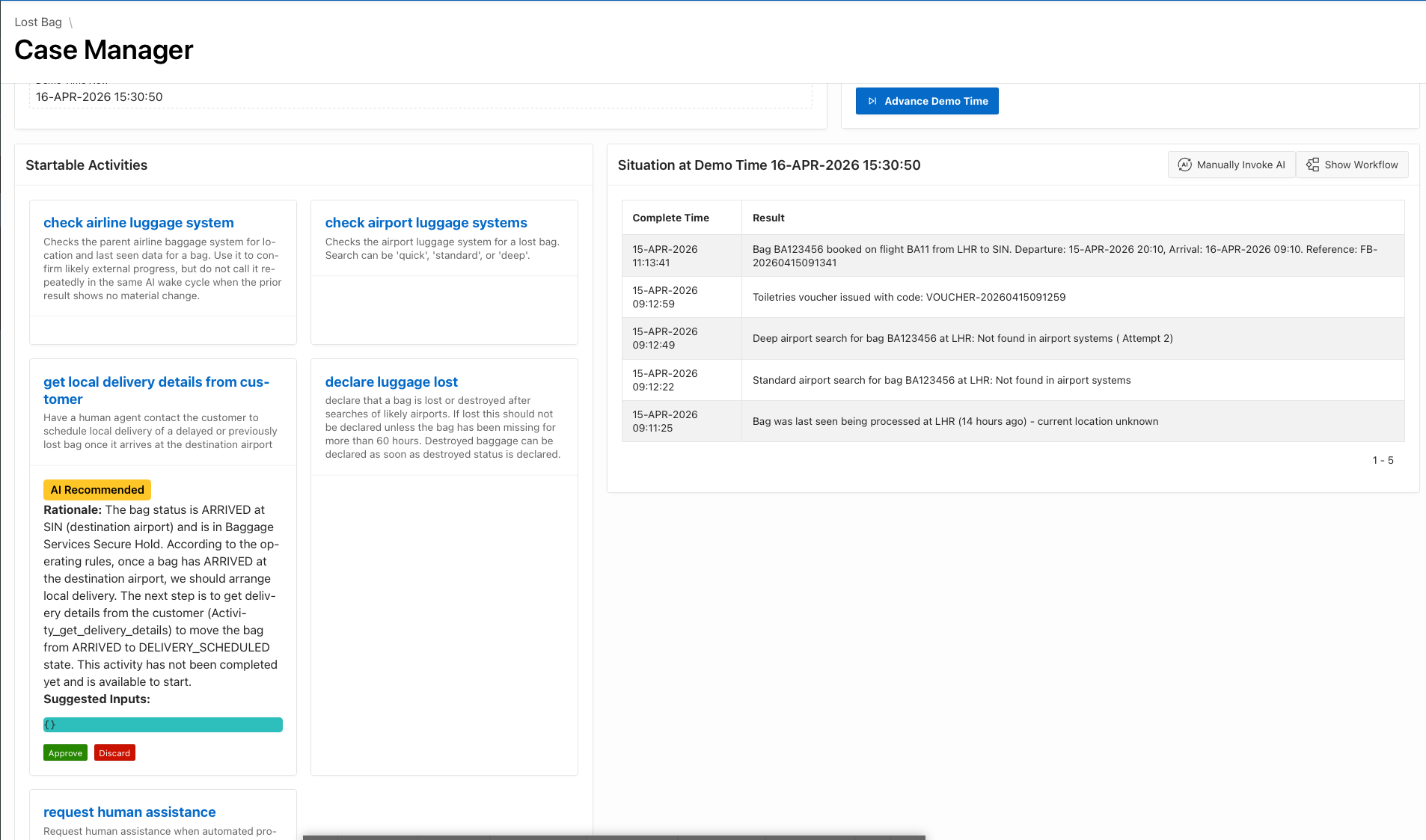
- All AI-engine calls in Flows for APEX return a human readable rationale or explanation from the AI engine to justify its decision making process. These rationales can be exposed in the application for users, and can also be included in process logging and in the instance logging archive document.
- While gaining confidence in AI, or in regulated environments where a human has to make critical process decisions, an adhoc sub process can be run in recommendation mode.
Business Capabilities Provided
AI-assisted and agentic execution allows organizations to introduce AI into workflow incrementally rather than through an all-or-nothing architectural jump.
This supports:
- decision support for knowledge workers in live process contexts
- gradual progression from recommendation to hybrid execution to autonomy
- AI use within BPMN-defined operational guardrails
- rationale capture and review for sensitive or regulated processes
Why Flows for APEX
Standalone agents can be powerful, but they often operate without a formal process frame. Flows for APEX places AI inside BPMN-defined boundaries so the agent can only act within the process design and available runtime state.
It is possible to add AI services to many applications, but Flows for APEX provides a more coherent orchestration pattern for combining AI decisions with BPMN activities, human approvals, runtime auditability, and controlled autonomy.
Generic automation tools may emphasize AI flexibility over process governance. Flows for APEX is aimed at teams who want AI adoption without losing workflow explainability, operational control, or Oracle APEX alignment.
Best-Fit Use Cases
- AI-assisted operational reviews and investigations
- complex case work where the best next action depends on context
- semi-autonomous business processes that still require human checkpoints
- regulated or high-trust environments where rationale and control matter
Edition Notes
AI-assisted and agentic Adhoc Sub Process execution is an Enterprise Edition capability introduced in v26.1.
For foundational concepts and manual runtime behavior, see Adhoc Sub Processes: Basics and Manual Runtime.