Adhoc Sub Processes are a powerful, but often overlooked, feature in BPMN that allow you to create a sub process where a knowledge worker has discretion to use, or not, activities to perform a task. They can perform those activities in any order, can repeat an activity, do not need to perform all of the activities, and can stop the sub process when they deem it complete. These adhoc sub processes are often one part of a bigger process that does have the more traditional, step-by-step sequence flow of normal workflow.
Example: An example of this mixture of step-by-step workflow with an unstructured, adhoc step is a typical doctor’s office visit. Step-by-step sequence flow exists to book an appointment, check-in, be weighed and measured, and put into the waiting room. But inside the doctor’s office, the doctor has 100+ questions, tests, procedures, and analyses that she can perform, in any order, sometimes more than once, to get to a diagnosis and complete the consultation. After this, the process reverts to sequential step-by-step workflows for billing (billing, insurance, payment), for tests (send to lab, get results, doctor’s review, schedule follow-up), for prescriptions (prescribe, send to pharmacy), and for follow-up appointments and referrals. This is an extreme example, but one that we can all relate to.
Example: Car Insurance Claims Processing. Many steps in the claims process are step-by-step sequence flows, but central to the process is a review of the claim by an insurance claims professional. The loss assessor has access to all of the claim information, but has additional tools that can be selectively used if his judgement suggests that the claim might be suspicious, from checking out the vehicle, the claimant, the repair shop, the cost, etc.
Flows for APEX v26.1 Supports Human Knowledge Worker Processes
Flows for APEX v26.1 allows you to model the activities that can be performed by a knowledge worker to complete a step in the business process. These activities are standard BPMN activities, such as user tasks, script tasks, service tasks requesting information from a REST source, and human approval tasks. Sometimes these activities can be part of a short chain of activities: if you perform A, you must then do B and C. An included activity can be a regular sub process (allowing the detail to be hidden or abstracted) or a call activity (where the details are contained in another diagram that can be reused across multiple business processes).
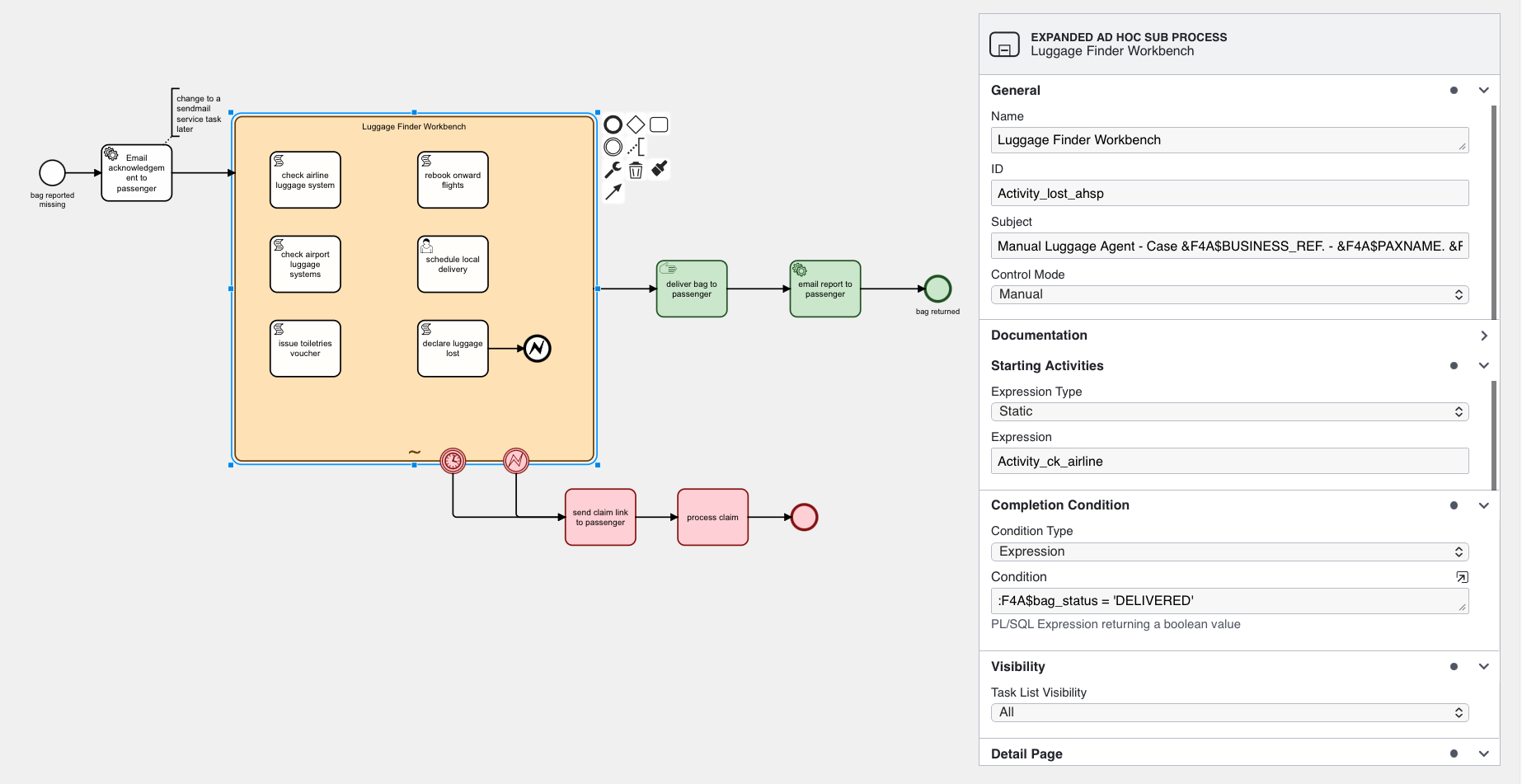
Some other concepts that can be added to the model:
- The adhoc sub process can have a set of activities that are started automatically when the adhoc sub process starts. This can be a static list, or created dynamically in the process and run dynamically when the process starts.
- The adhoc sub process can have a completion condition, which defines when the sub process has completed and the workflow moves forwards to the next sequential activity. Any still-running activities inside the adhoc sub process are terminated.
- BPMN boundary events can be added to the adhoc sub process so that, for example, the process sends reminders if not completed by a given time, can terminate if not completed by a cut-off time, or can send a message to a manager if the process sends an escalation request.
- Activities inside the adhoc sub process may require input parameters. When run as a manually controlled adhoc sub process, the application can automatically create an input form to collect this information without having to precede each task with a user task.
- Adhoc Sub Process and task definitions are designed for easy user use. In addition to a technical name, each activity has a descriptive name and a short description of its purpose. These are used in creating a human UI.
- Task definitions include ordering and grouping information that can be used for UI layout. Additionally, you can define whether the Adhoc Sub Process and or any user tasks that it creates appear in the unassigned user’s task list.
- Activities can be specified as being allowed to be performed only once or as repeatable.
- Activities can optionally have a starting condition, meaning that the activity is only available to be started when a condition is true. Combined with a process variable containing process state, this allows staging and gating of activities within the overall sub process.
- By convention, each activity in an adhoc sub process returns output parameters that include a short textual result statement and optionally a list of key outputs. By having standardised outputs, these can be collected to provide a brief summary of what activities have been performed so far, and with what result.
Automatically Transforming Model to App User Interface
The Adhoc Sub Process definition features allow simple and automatic creation of run-time user interfaces:
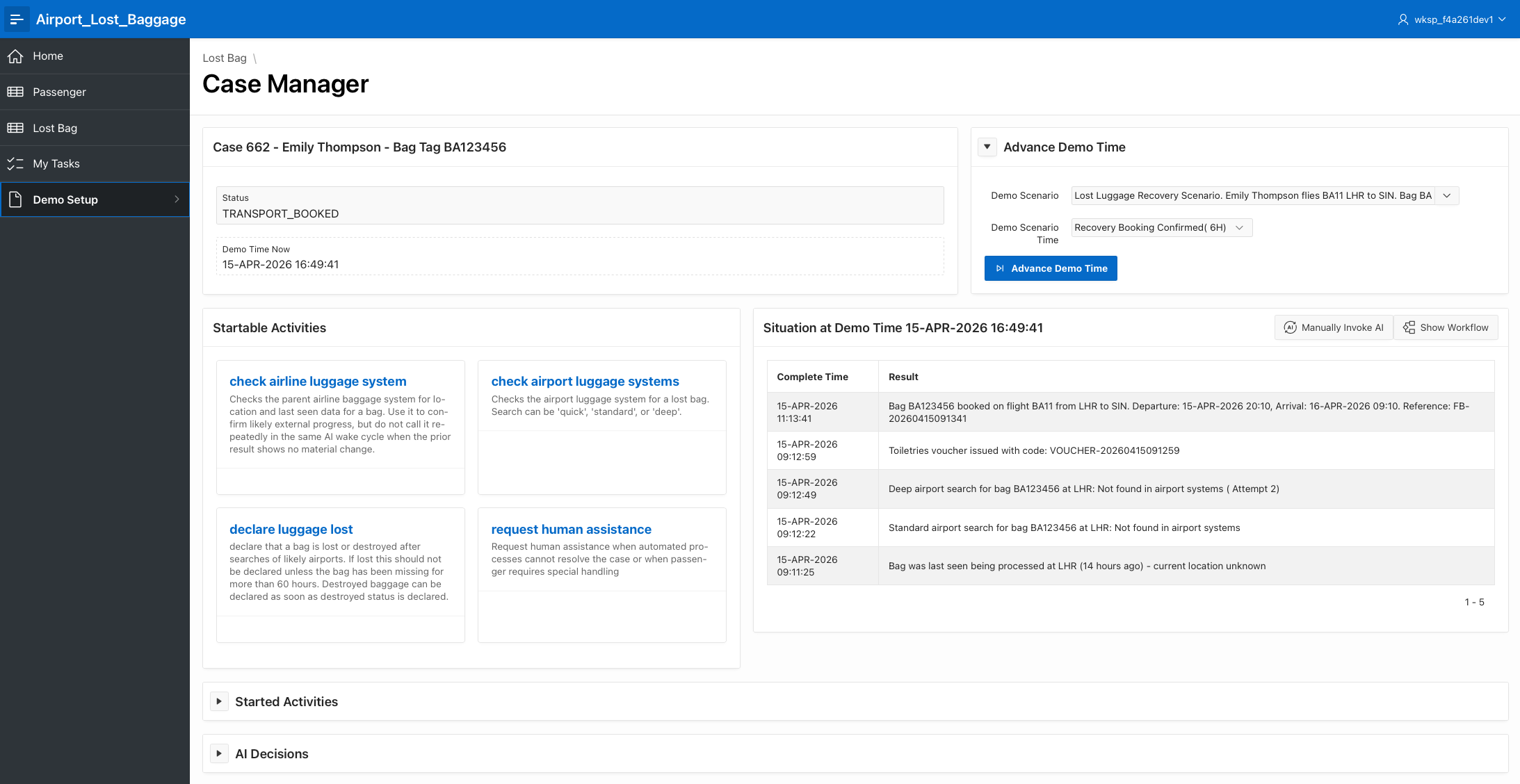
- Available Activities
- Completed Activities Log
Business Capabilities Provided
Adhoc Sub Processes allow organizations to support work that is too variable for a rigid step-by-step sequence, but still too important to leave outside workflow governance.
This is particularly useful for:
- investigations, reviews, and assessments where the next best step depends on findings
- case-management style work where skilled staff need discretion
- knowledge-worker processes that mix optional activities with required governance
- situations where teams want runtime flexibility without losing auditability
Why Flows for APEX
Adhoc Sub Processes bring a BPMN capability that is designed specifically for discretionary, knowledge-worker process behavior. That allows Flows for APEX to support work patterns that do not fit cleanly into a strict linear or approval-only model.
Many teams simulate flexible work by building large custom pages full of buttons, conditions, and special-case rules. Flows for APEX keeps that flexibility inside a governed BPMN structure, which is easier to reason about, review, and evolve.
External tools may support flexible work, but they can sit awkwardly beside Oracle APEX applications. Flows for APEX allows the discretionary work model to remain close to the application, the data, and the BPMN process that surrounds it.
Best-Fit Use Cases
- medical or clinical review workflows
- insurance and claims assessment
- compliance investigations and exception handling
- service operations where staff choose from a set of optional actions
Edition Notes
Adhoc Sub Process support described on this page is an Enterprise Edition capability introduced in v26.1.
For AI-powered and agentic Adhoc Sub Processes, see Adding AI and Agentic Adhoc Sub Processes.